
0. Para quem não está familiarizado com o treino baseado na velocidade
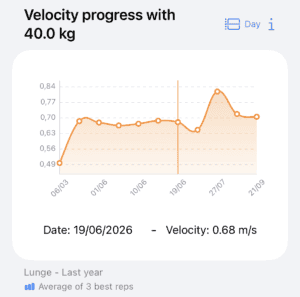
O treino baseado na velocidade (VBT) consiste em controlo da velocidade de execução de repetições realizadas com a máxima intenção de prescrever e controlar o treino de força de forma objetiva. O VBT permite-lhe ajustar a carga diária com base nos níveis de fadiga, motivar os atletas através de feedback em tempo real e acompanhar com precisão o progresso a longo prazo. Ao medir a velocidade, é possível determinar exatamente o que percentagem da força máxima de uma só repetição (%1RM) está a ser levantado sem necessidade de atingir a falha muscular durante o teste.
Em esta ligação, Se quiser saber mais sobre o VBT e como aplicá-lo utilizando o Spleeft, pode fazer perguntas ao nosso NotebookLM personalizado, alimentado por fontes de alta qualidade.
1. Descarregue o Spleeft e experimente-o primeiro
Para supervisionar os seus atletas, tem de começar por dominar as ferramentas que eles vão utilizar. Descarregue a aplicação e experimente medir a velocidade com o seu iPhone ou Apple Watch. A aplicação guiá-lo-á ao longo do processo. Pode até testá-la em casa; não é necessário ir ao ginásio para o primeiro teste.
2. Ligação entre o atleta e o treinador
Peça aos seus atletas para descarregarem o Spleeft e seguirem este caminho: Perfil → Partilhar com um treinador. Aí, devem criar uma hiperligação e enviá-la para si por mensagem ou correio eletrónico. Ao clicar na ligação, aceitará o convite e os dados dele começarão a aparecer no seu perfil. Lembre-se de que, como treinador, precisa de um Treinador Spleft assinatura para adicionar atletas à sua conta.
Uma vez concluída esta etapa, receberá automaticamente os dados dos seus atletas nos seus dispositivos.
3. Importação de dados e gestão do armazenamento
Se os seus atletas ficarem sem armazenamento iCloud ou utilizarem dispositivos Android com codificadores manuais, existem alternativas para receber as suas informações. Os atletas podem exportar dados brutos de um dia específico no seu histórico e enviar-lhe o ficheiro para uma importação rápida para a sua aplicação. Além disso, o Spleeft suporta a função importação manual de ficheiros .xlsx e .csv, bem como dados de outros dispositivos de medição da velocidade.
4. Sincronização com o TrainingPeaks
Para um fluxo de trabalho ainda mais cómodo, peça aos seus atletas que associem as suas contas em Definições → TrainingPeaks. Uma vez ligado, os dados da sessão serão carregados automaticamente. Poderá ver a velocidade de execução no canal “Velocity/KPH” e a carga no canal “Cadence/RPM”. Um resumo gerado por IA será incluído nos comentários para que possa decidir rapidamente se é necessária uma análise mais aprofundada.
5. Ensiná-los a medir com o iPhone ou o Apple Watch
A precisão depende da técnica de medição correta. Instrua os seus atletas a fazer uma breve pausa entre as repetições (menos de um segundo é normalmente suficiente) para permitir que o algoritmo recalibre o sinal. Devem esperar que o o indicador no ecrã fica verde (ou para o Apple Watch vibrar no modo “Boost”) antes de iniciar a próxima repetição. É fundamental que efectuem a fase concêntrica com intenção voluntária máxima para que os dados sejam válidos para os ajustamentos de carga.
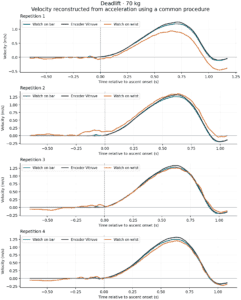
Spleeft é um validado mas é preciso saber como utilizá-lo corretamente.
6. Sincronização com outros dispositivos
Se já trabalham com outros sistemas, ensine os seus atletas a utilizar o iOS “Extensão da ação”.” A partir da aplicação do seu dispositivo (como Vitruve, ADR Encoder ou OVR), devem tocar em “Partilhar” e selecionar “Sincronizar dados VBT com Spleeft.” O Spleeft é diretamente compatível com dispositivos como Velocidade OVR e Salto OVR, centralizando todos os dados de VBT e de saltos num único local. Se o utilizador utilizar um dispositivo não nativo, o Spleeft utiliza um Modelo de IA para processar e guardar os dados no seu formato.
Disponibilizamos este caderno para que possa colocar todas as questões que tenha. Lembre-se, se representa um clube ou organização, pode contactar-nos em info@spleeft.app para obter assistência personalizada na implementação do VBT.