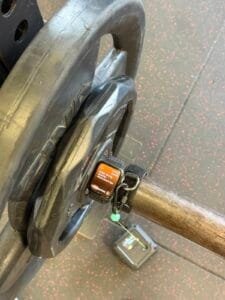
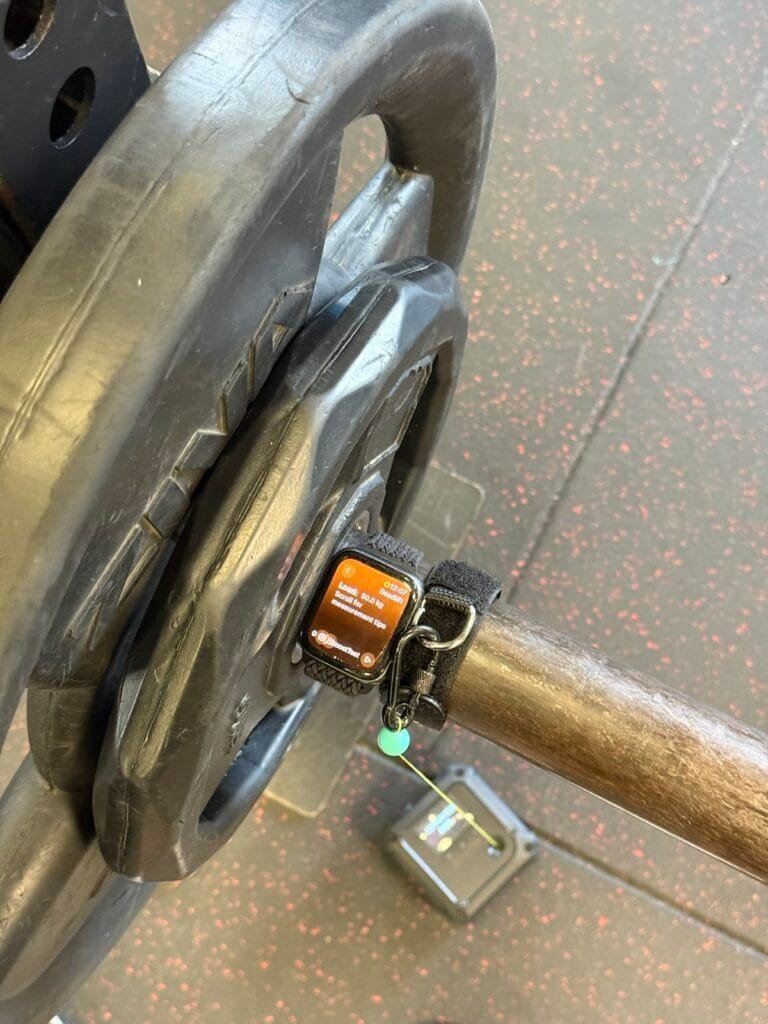
When measuring bar velocity with Apple Watch during deadlifts, does it matter whether you wear the watch on your wrist or attach it to the bar? After we shared the latest improvements to Spleeft, one of the most common questions was why an Apple Watch appeared strapped to the bar instead of on my wrist.
I understand the reaction. A watch on a bar catches your eye and, yes, I knew that image could spark curiosity. But behind it was a question we had been investigating for a while: could we make the measurements even more reliable by placing the watch on the bar? In practice, deadlift measurements with the watch on the wrist did not seem as reliable as measurements in other exercises, such as the squat. The independent Apple Watch validation study also reported this difference.
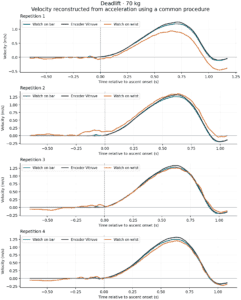
In our simultaneous deadlift tests, the watch attached to the bar recorded fewer oscillations before the ascent. When we reconstructed both signals using the same procedure, its velocity curve was also closer to the encoder’s in most repetitions. Here are the data and the limits of that comparison.
Apple Watch on the Bar or Wrist: What Movement Does the Sensor Measure?
When you wear an Apple Watch on your wrist during a deadlift, your hand moves with the bar. However, that does not mean their movements are identical at every moment.
Before lifting, you may adjust your grip, tension your arms or slightly change your wrist position. Those movements can reach the sensor even when the bar has barely moved. Strap fit and vibrations can also influence the recording.
Our hypothesis was that some of the irregularities at the start came from the interaction between the body, wrist and watch. Attaching it to the bar could reduce those relative movements and bring the signal closer to the object whose velocity we wanted to measure.
This matters because Spleeft reconstructs velocity from acceleration. A small error in that signal can accumulate during integration. What happens just before the ascent can affect the starting point and, subsequently, the trace of the whole repetition.
How We Tested Apple Watch During Deadlifts Against Vitruve
This research is part of our ongoing work with training recordings, which we describe in our article on improving Spleeft’s velocity algorithm with real data. For this article, we will show three signals recorded simultaneously during the same sets:
- An Apple Watch SE (1st generation) attached to the bar, running the new version of the algorithm.
- An Apple Watch Series 8 on the wrist, running the previous version.
- A Vitruve linear encoder as an external reference.
This allowed us to compare the same execution, without relying on two sets performed at different times being equivalent.
For this analysis, we will show four deadlift sets with all three recordings: one at 60 kg, two at 70 kg and one at 80 kg. That left 15 comparable repetitions. One additional repetition lacked sufficient wrist data before the lift and was excluded; another set had only the watch recording from the bar.
Results: Bar Velocity Across 15 Deadlift Repetitions
The watch on the bar produced a velocity trace closer to Vitruve in 14 of the 15 repetitions, with a lower average error in all four sets.
To quantify that closeness, we calculated RMSE: a measure of the difference between the curves, sample by sample. A lower value means the curves are closer in this comparison.
| Measure across the 15 shared repetitions | Watch on bar | Watch on wrist |
|---|---|---|
| Average RMSE during the ascent | 0.033 m/s | 0.092 m/s |
| Average RMSE around the start | 0.011 m/s | 0.057 m/s |
The initial window runs from 0.25 seconds before to 0.15 seconds after the start of the concentric phase, identified using Vitruve. These figures are averages of the trace error per repetition; they are not mean-velocity errors or app reliability percentages.
When reviewing acceleration, we also saw fewer oscillations on the bar before several ascents. That difference helps explain why improving the signal entering the algorithm matters alongside improving the algorithm itself.
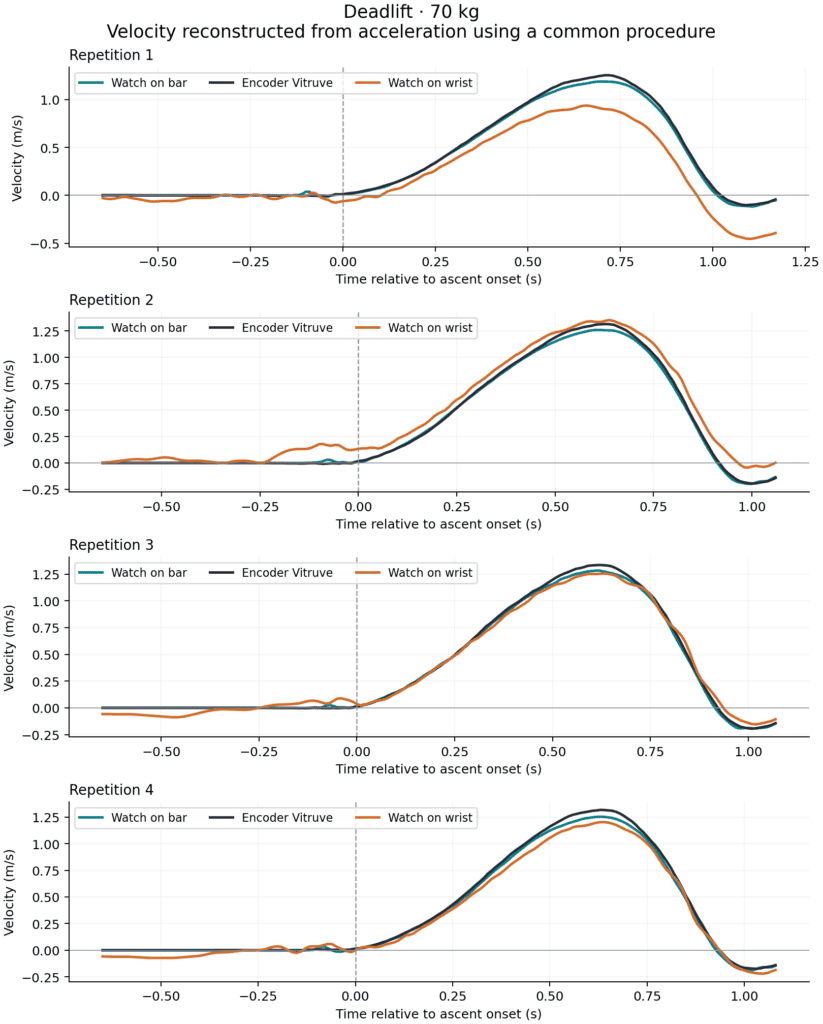
There are examples where the wrist records oscillations before the encoder shows a clear ascent. Its reconstructed velocity may then become offset or deviate in amplitude. The watch on the bar follows the reference more closely in many of those cases.
What About Lunges? The Difference Was Not the Same
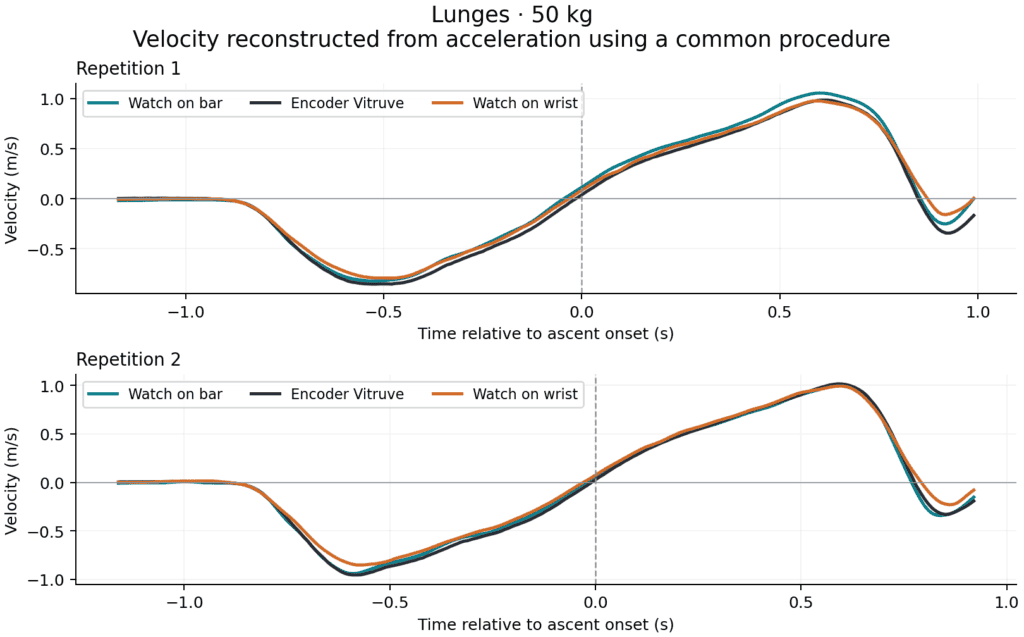
In that session, we also recorded two lunge sets at 50 kg, simultaneously using the watch on the bar, the watch on the wrist and Vitruve.
Here, the acceleration signals from the wrist and bar were very similar to each other and to the encoder’s. We did not observe as clear a separation between placements as we saw before several deadlift ascents.
What We Can Conclude for Training
This comparison gives us a practical reason to keep studying bar placement during deadlifts: it brings the sensor closer to the movement we want to measure and, in these tests, produced a more stable signal before the lift and velocity curves closer to Vitruve.
The advantage observed in deadlifts and the less clear result in lunges encourage us to study each exercise separately. However, we think bar placement may benefit exercises where the bar is held in the hands without being cushioned against the body, potentially including the bench press.
For other exercises, such as squats and hip thrusts, we still believe that wearing the watch on the wrist offers a balance between convenience and reliability.
Velocity and Acceleration Data in Spleeft: Learning to Use Each Technology
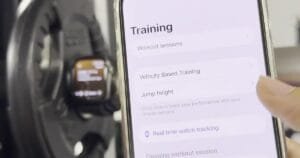
This work also led to a Spleeft feature, introduced in the Smart Zero, Apple Watch controls and new metrics update: making velocity and acceleration recordings available to users inside the app, so they can review what happened during their set.
In some deadlift recordings, it is clear that velocity does not match what should be happening: before a repetition begins, when the bar is stationary, the curve may show oscillations or drift away from zero. Small wrist movements, vibrations and other external factors can contribute to these irregularities.
Showing the signal allows users to compare it with their execution. Does the curve return close to zero during a pause? Does movement appear before the lift? Is there an irregularity that coincides with an adjustment to the grip or watch? These questions help users recognize when a measurement needs reviewing and how to improve placement or their procedure in the next set.
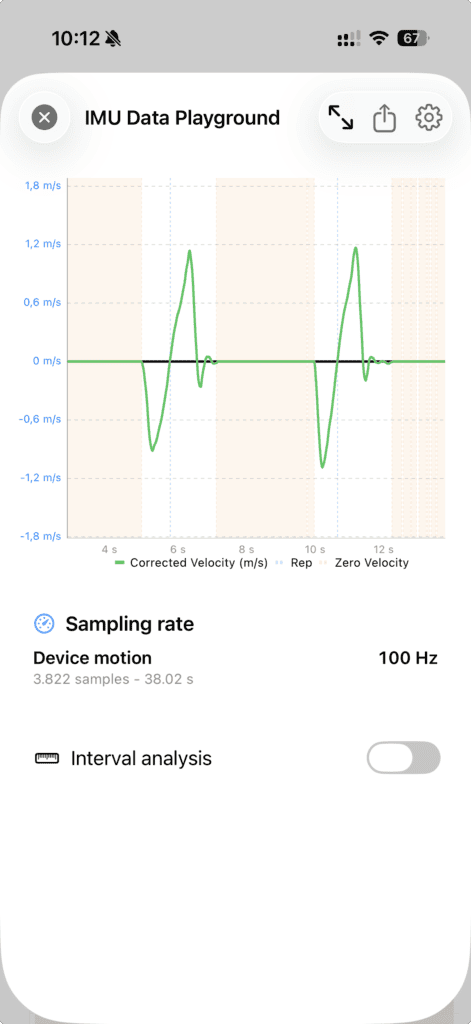
We want users to understand their data and learn to use the tool better. Reliability also depends on teaching where to place the sensor, which signals are worth reviewing and when to interpret a result more cautiously. Giving users access to recordings supports that learning with what happened in their own training.
Our Focus: Data That Helps You Make Decisions
Artificial intelligence is making app development more accessible. It helps us write code, explore ideas and move faster. At Spleeft, we also use it to analyze recordings and review our own interpretations, as we did in this comparison.
That has led me to concentrate my effort on what I consider most valuable for people training with the app: the quality of the data and its usefulness for everyday decisions.
Apple provides the device and its sensors. Our work is to understand how they behave during training, develop the algorithm that interprets those signals and test it in our users’ real conditions. Training experience, field tests and data analysis all contribute, supported by AI.
Our priority is to improve measurement reliability and help users recognize its limits, so that recorded velocity can provide useful information when adjusting a load, monitoring fatigue or assessing progress.
We want velocity-based training to be more accessible, and that accessibility also requires care with the quality of what we measure. That is the work we want to keep doing at Spleeft: using tools that help us move faster to build measurements that are increasingly useful in real training.
Frequently Asked Questions About Apple Watch for Deadlifts
Is It Better to Place Apple Watch on the Bar Than on the Wrist?
In this deadlift session, the reconstructed velocity from the watch on the bar was closer to Vitruve in 14 of the 15 comparable repetitions. This is an exploratory result: the watch model and software version differed, and the reconstruction used information from the encoder. It does not demonstrate a universal advantage or the app’s independent accuracy.
Do the Graphs Show the Velocity Spleeft Calculates in Real Time?
No. To compare the signals, we applied a common procedure to the exported acceleration, with help from Vitruve to delimit the ascents and establish the initial condition. The graphs show that offline reconstruction.
What Can I Learn by Reviewing My Set’s Recordings?
You can check whether velocity approaches zero during pauses and whether irregularities appear before lifting. Comparing the curve with your execution helps you review placement and procedure; a coherent curve alone does not guarantee accuracy.
If you want to explore velocity-based training with your Apple Watch or iPhone, download Spleeft from the App Store. Start by reviewing your own sets and how the recordings relate to your execution.